Argo CD
Argo CD is the bundled GitOps controller. In the provided environment it is enabled by default, so a normal terragrunt run --all apply installs the Argo CD chart and exposes it through a Traefik Ingress with a Let's Encrypt certificate.
Configure or disable it
Argo CD is configured from infra/<env>/env.hcl. That is where you control whether it is enabled, which hostname it uses, and which chart version is installed.
To skip Argo CD in a new environment, set its enabled flag to false before the first apply:
If Argo CD is already installed, destroy the argocd unit before flipping the flag. Once enabled = false, Terragrunt excludes that unit from future runs.
Warning
Destroying the argocd unit deletes the Argo CD namespace and everything in it: registered repos, applications, projects, and accounts. The cluster keeps running, but anything Argo CD was syncing stops being reconciled.
Tune chart values
Use helm_set in the Argo CD block in infra/<env>/env.hcl for chart values
that the module does not expose directly. Use helm_set_sensitive for values
that must stay out of plan and apply output.
See Helm value overrides for examples, limits, and the required git hook.
Access the UI
The UI is exposed through Traefik at the Argo CD host configured in env.hcl.
The default user is admin. The initial password is generated by the chart on first install and stored in the argocd-initial-admin-secret Kubernetes Secret:
kubectl -n argocd get secret argocd-initial-admin-secret \
  -o jsonpath='{.data.password}' | base64 -d; echo
After the first login, rotate the password from the Argo CD UI (User Info → Update password).
The initial admin secret is removed after first password rotation
Argo CD deletes argocd-initial-admin-secret once you change the admin password through the UI. Save the rotated password somewhere durable before doing that.
Argo CD CLI
The CLI is optional but useful for scripting and for managing accounts/projects.
The CLI uses the same admin password as the UI. For service accounts or CI integration, create a dedicated Argo CD local user and issue a token; see the upstream user management docs.
Add your first Application
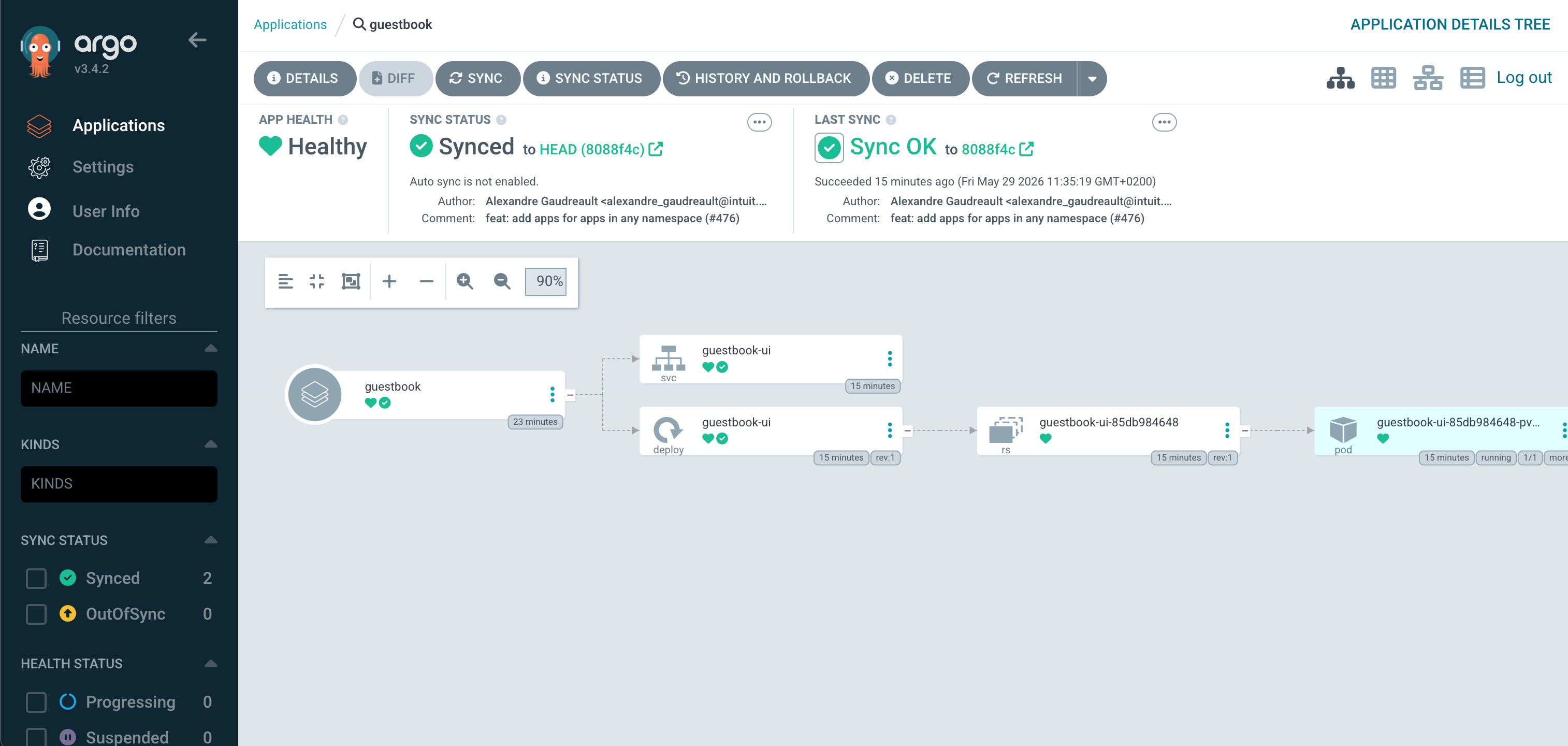
The fastest way to see Argo CD do something is the canonical guestbook sample. After argocd login, create the Application from the CLI:
argocd app create guestbook \
  --repo https://github.com/argoproj/argocd-example-apps.git \
  --path guestbook \
  --dest-server https://kubernetes.default.svc \
  --dest-namespace default
Sync it, then check the result in the cluster:
argocd app sync guestbook
argocd app get guestbook
kubectl -n default get pods,svc -l app=guestbook-ui
The Application now appears in the Argo CD UI and reconciles whenever the upstream repo changes.
Declarative equivalent
Imperative argocd app create is fine for poking around, but real GitOps puts the Application itself in a Git repo so Argo CD reconciles it the same way as anything else. The equivalent declarative manifest for the same guestbook sample:
apiVersion: argoproj.io/v1alpha1
kind: Application
metadata:
  name: guestbook
  namespace: argocd
spec:
  project: default
  source:
    repoURL: https://github.com/argoproj/argocd-example-apps.git
    targetRevision: HEAD
    path: guestbook
  destination:
    server: https://kubernetes.default.svc
    namespace: default
  syncPolicy:
    automated:
      prune: true
      selfHeal: true
    syncOptions:
      - CreateNamespace=true
Apply it with kubectl -n argocd apply -f app.yaml, or commit it to a repo Argo CD is already watching (the "app-of-apps" pattern). The upstream getting started guide covers private repos, Helm value overrides, and ApplicationSets.
Resource expectations
Argo CD is comfortable on small Hetzner nodes. The repo-server and application-controller are the heaviest components and grow with the number of tracked Applications and repos.
If argocd-application-controller pods start getting OOMKilled with many Applications, first add worker capacity in agent_nodepools before tuning Helm resource values blind.